Load Balancing
Picture this. You built an app. It went from 10 users to 10,000 users in a week (lucky you). And now your one server, the one that used to handle everything just fine, is sweating. Requests are timing out. Someone's refreshing the page and getting a blank screen. Your server isn't broken, it's just... overwhelmed. One person trying to serve a stadium full of people.
This is exactly the problem a load balancer solves. And once you get it, you'll wonder how anything at scale works without one.
So what actually is a load balancer?
Think of it as a really smart traffic cop standing at the entrance of a highway with three lanes open. Cars (that's your users' requests) come in from one direction, and instead of shoving everyone into lane one, the cop looks at what's happening and waves cars toward whichever lane has room.
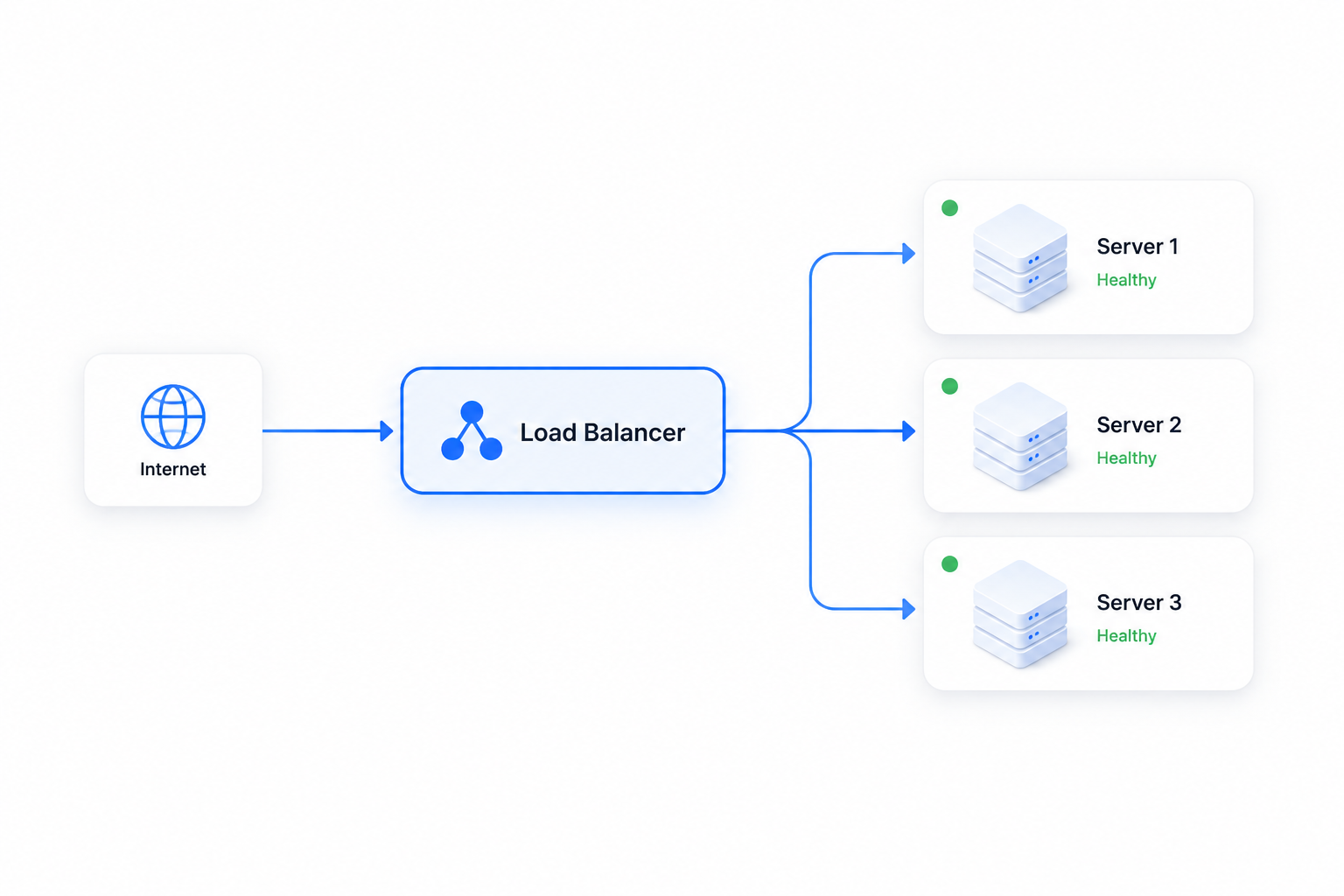
That's the picture above, basically. Traffic comes in from the internet, hits the load balancer, and instead of going straight to one server, it gets spread across Server 1, Server 2, and Server 3, all marked "Healthy" with that little green dot. No single server carries the whole weight. Nobody's overwhelmed, nobody's idle.
Without this piece, you'd need one enormous server that can handle every single request alone. That's expensive, and honestly, it's fragile. One crash and your whole app is down. Spread the load across multiple servers, and if one goes down, the others just pick up the slack. Users don't even notice.
The routing part: how does it decide who gets what?
Here's where it gets interesting. The load balancer isn't just randomly throwing requests at servers. It follows an algorithm, a set of rules for deciding "okay, this request goes here."
A few of the popular ones:
- Round-Robin is the simplest. Request one goes to Server 1, request two goes to Server 2, request three goes to Server 3, and then it loops back to Server 1 again. Like dealing cards at a poker table, everyone gets a turn in order. Simple, predictable, works great when all your servers are roughly equal in power.
- Least Connections is a bit smarter. Instead of just going in order, it checks: which server currently has the fewest active connections? And it sends the new request there. Makes sense, right? If Server 2 is already juggling 500 requests and Server 3 only has 50, why pile more onto Server 2?
- Consistent Hashing is the one that trips people up at first, but it's actually pretty elegant. Imagine you want the same user to always land on the same server (maybe because that server has their session data cached). Consistent hashing takes something like the user's ID or IP address, runs it through a hash function, and consistently sends that same input to the same server. And the "consistent" part matters a lot: if you add or remove a server, it doesn't reshuffle everyone, it only affects a small slice of the traffic. That's huge for caching systems and anything where you don't want a server swap to cause chaos.
But what happens when a server actually dies?
Good question, and this is where health checks come in.
The load balancer doesn't just blindly trust that Server 1, 2, and 3 are alive and well. It's constantly pinging them, sort of like a manager doing a quick check-in: "hey, you good?" These are called health probes, and they run on a schedule, every few seconds usually.
If a server stops responding, or starts throwing errors, the load balancer notices and quietly stops sending traffic its way. No user ever finds out that Server 2 crashed at 3am. Traffic just flows to Server 1 and 3 instead, and the app keeps running like nothing happened. That's the whole point of the green "Healthy" tags you see in that diagram. Behind each one is a health check making sure it's actually true.
This ties into something called active-passive failover too. Sometimes you don't want all servers handling traffic at once. You might keep one as a backup, sitting quietly, doing nothing, until the active one fails. The moment that happens, the passive one steps in. Think of it like a substitute teacher who's just waiting in the staff room in case the main teacher calls in sick.
Quick note on Layer 4 vs Layer 7
You'll hear these terms thrown around a lot, so worth clearing up early.
A Layer 4 load balancer works at the transport layer. It looks at basic stuff, IP addresses and ports, and routes traffic without really looking at what's inside the request. It's fast because it's not doing much thinking.
A Layer 7 load balancer works at the application layer. It can actually look inside the HTTP request, check the URL path, the headers, cookies, whatever, and make smarter routing decisions based on that. Slower, but way more flexible. Want to send all /api/images requests to a server optimized for that? That's an L7 load balancer's job.
Most modern setups (like Nginx, HAProxy, or cloud load balancers like AWS ELB) support both, and you pick based on what your app actually needs.
Why this matters beyond just "traffic"
Load balancing isn't just about splitting requests evenly. It's really about three things stacked together: availability (your app stays up even if one server dies), scalability (you can add more servers as you grow, instead of needing one giant machine), and performance (nobody's stuck waiting because one server is overloaded while another sits idle).
It's the kind of thing that's invisible when it's working right.
Nobody praises a load balancer. But the day it's misconfigured or missing, everybody notices.
- Start with the problem, not the definition. Say something like: "A single server has limits, in traffic it can handle and in reliability. A load balancer distributes incoming requests across multiple servers so no single one gets overwhelmed, and if one fails, others keep serving traffic."
- Name the algorithms, briefly. Mention Round-Robin (simple, cyclic), Least Connections (traffic-aware), and Consistent Hashing (useful when you need the same client to hit the same server, like for session stickiness or caching). Naming all three shows you understand there's no one-size-fits-all approach.
- Bring up health checks. This is the detail that separates a surface-level answer from a solid one. Explain that the load balancer actively probes servers and removes unhealthy ones from rotation automatically, that's what gives you high availability.
- Mention L4 vs L7 if it's relevant to the role. For backend or infra-heavy roles, this shows depth: "L4 balances based on IP/port, L7 can route based on actual request content like URL paths or headers."
- If they push further, talk about failover strategies (active-passive vs active-active) and maybe sticky sessions, since that's a natural follow-up question once you mention consistent hashing.
Keep the answer structured, problem first, then solution, then the nuance. That's usually what interviewers are actually listening for, not just definitions, but whether you understand why each piece exists.
Mark as Explored
Save your progress to your local dashboard metrics.